
How to List Mobile Legends Accounts for Sale: Seller Tips
'%20fill='%23030712'/%3e%3cg%20id='&%23228;&%23189;&%23156;&%23232;&%23128;&%23133;&%23230;&%23160;&%23143;'%3e%3cg%20id='Frame%202085661462'%3e%3cg%20id='share_h5/&%23231;&%23142;&%23176;&%23231;&%23148;&%23168;'%3e%3cpath%20d='M-98%20-7.5H244C248.142%20-7.5%20251.5%20-4.14214%20251.5%200V28C251.5%2032.1421%20248.142%2035.5%20244%2035.5H-98C-102.142%2035.5%20-105.5%2032.1421%20-105.5%2028V0C-105.5%20-4.14214%20-102.142%20-7.5%20-98%20-7.5Z'%20fill='%23101828'/%3e%3cpath%20d='M-98%20-7.5H244C248.142%20-7.5%20251.5%20-4.14214%20251.5%200V28C251.5%2032.1421%20248.142%2035.5%20244%2035.5H-98C-102.142%2035.5%20-105.5%2032.1421%20-105.5%2028V0C-105.5%20-4.14214%20-102.142%20-7.5%20-98%20-7.5Z'%20stroke='%231E2939'%20stroke-linecap='round'/%3e%3cg%20id='Frame%202085661496'%3e%3cg%20id='img_share_x'%3e%3cg%20clip-path='url(%23clip0_6059_2375)'%3e%3cg%20id='ic_share_x'%3e%3crect%20width='28'%20height='28'%20fill='url(%23paint0_linear_6059_2375)'/%3e%3cg%20id='union_icon'%20filter='url(%23filter0_d_6059_2375)'%3e%3cpath%20d='M6.33728%207.15527L12.283%2014.7055L6.2998%2020.8442H7.6465L12.8849%2015.4695L17.1173%2020.8442H21.6998L15.4194%2012.8693L20.9886%207.15527H19.6419L14.8177%2012.105L10.9198%207.15527H6.33728ZM8.31765%208.09727H10.4228L19.7192%2019.9022H17.614L8.31765%208.09727Z'%20fill='white'/%3e%3c/g%3e%3c/g%3e%3c/g%3e%3c/g%3e%3c/g%3e%3c/g%3e%3c/g%3e%3c/g%3e%3c/g%3e%3cdefs%3e%3cfilter%20id='filter0_d_6059_2375'%20x='4.2998'%20y='5.15527'%20width='19.4'%20height='17.6889'%20filterUnits='userSpaceOnUse'%20color-interpolation-filters='sRGB'%3e%3cfeFlood%20flood-opacity='0'%20result='BackgroundImageFix'/%3e%3cfeColorMatrix%20in='SourceAlpha'%20type='matrix'%20values='0%200%200%200%200%200%200%200%200%200%200%200%200%200%200%200%200%200%20127%200'%20result='hardAlpha'/%3e%3cfeOffset/%3e%3cfeGaussianBlur%20stdDeviation='1'/%3e%3cfeComposite%20in2='hardAlpha'%20operator='out'/%3e%3cfeColorMatrix%20type='matrix'%20values='0%200%200%200%200.168407%200%200%200%200%200.17864%200%200%200%200%200.199106%200%200%200%201%200'/%3e%3cfeBlend%20mode='normal'%20in2='BackgroundImageFix'%20result='effect1_dropShadow_6059_2375'/%3e%3cfeBlend%20mode='normal'%20in='SourceGraphic'%20in2='effect1_dropShadow_6059_2375'%20result='shape'/%3e%3c/filter%3e%3clinearGradient%20id='paint0_linear_6059_2375'%20x1='14'%20y1='1.49012e-07'%20x2='14'%20y2='52.5'%20gradientUnits='userSpaceOnUse'%3e%3cstop%20stop-color='%23717379'/%3e%3cstop%20offset='1'%20stop-color='%23282A2D'/%3e%3c/linearGradient%3e%3cclipPath%20id='clip0_6059_2375'%3e%3crect%20width='28'%20height='28'%20rx='14'%20fill='white'/%3e%3c/clipPath%3e%3c/defs%3e%3c/svg%3e)
'%20fill='%23030712'/%3e%3cg%20id='&%23228;&%23189;&%23156;&%23232;&%23128;&%23133;&%23230;&%23160;&%23143;'%3e%3cg%20id='Frame%202085661462'%3e%3cg%20id='share_h5/&%23231;&%23142;&%23176;&%23231;&%23148;&%23168;'%3e%3cpath%20d='M-150%20-7.5H192C196.142%20-7.5%20199.5%20-4.14214%20199.5%200V28C199.5%2032.1421%20196.142%2035.5%20192%2035.5H-150C-154.142%2035.5%20-157.5%2032.1421%20-157.5%2028V0C-157.5%20-4.14214%20-154.142%20-7.5%20-150%20-7.5Z'%20fill='%23101828'/%3e%3cpath%20d='M-150%20-7.5H192C196.142%20-7.5%20199.5%20-4.14214%20199.5%200V28C199.5%2032.1421%20196.142%2035.5%20192%2035.5H-150C-154.142%2035.5%20-157.5%2032.1421%20-157.5%2028V0C-157.5%20-4.14214%20-154.142%20-7.5%20-150%20-7.5Z'%20stroke='%231E2939'%20stroke-linecap='round'/%3e%3cg%20id='Frame%202085661496'%3e%3cg%20id='img_share_fb'%3e%3cg%20clip-path='url(%23clip0_6059_2375)'%3e%3cg%20id='&%23231;&%23164;&%23190;&%23229;&%23170;&%23146;&%23229;&%23155;&%23190;&%23230;&%23160;&%23135;/&%23232;&%23132;&%23184;&%23228;&%23185;&%23166;2'%3e%3cg%20clip-path='url(%23clip1_6059_2375)'%3e%3cg%20id='ic_share_facebook'%3e%3crect%20width='28'%20height='28'%20fill='url(%23paint0_linear_6059_2375)'/%3e%3cg%20id='Path'%20filter='url(%23filter0_d_6059_2375)'%3e%3cpath%20fill-rule='evenodd'%20clip-rule='evenodd'%20d='M18.8125%209.07812H16.8437C16.2531%209.07812%2015.8594%209.47187%2015.8594%2010.0625V12.0312H18.8125V14.9844H15.8594V21.875H12.9062V14.9844H10.9375V12.0312H12.9062V9.57031C12.9062%207.7%2014.4812%206.125%2016.3516%206.125H18.8125V9.07812Z'%20fill='white'/%3e%3c/g%3e%3c/g%3e%3c/g%3e%3c/g%3e%3c/g%3e%3c/g%3e%3c/g%3e%3c/g%3e%3c/g%3e%3c/g%3e%3c/g%3e%3cdefs%3e%3cfilter%20id='filter0_d_6059_2375'%20x='8.9375'%20y='4.125'%20width='11.875'%20height='19.75'%20filterUnits='userSpaceOnUse'%20color-interpolation-filters='sRGB'%3e%3cfeFlood%20flood-opacity='0'%20result='BackgroundImageFix'/%3e%3cfeColorMatrix%20in='SourceAlpha'%20type='matrix'%20values='0%200%200%200%200%200%200%200%200%200%200%200%200%200%200%200%200%200%20127%200'%20result='hardAlpha'/%3e%3cfeOffset/%3e%3cfeGaussianBlur%20stdDeviation='1'/%3e%3cfeComposite%20in2='hardAlpha'%20operator='out'/%3e%3cfeColorMatrix%20type='matrix'%20values='0%200%200%200%200.0674988%200%200%200%200%200.421887%200%200%200%200%200.838585%200%200%200%201%200'/%3e%3cfeBlend%20mode='normal'%20in2='BackgroundImageFix'%20result='effect1_dropShadow_6059_2375'/%3e%3cfeBlend%20mode='normal'%20in='SourceGraphic'%20in2='effect1_dropShadow_6059_2375'%20result='shape'/%3e%3c/filter%3e%3clinearGradient%20id='paint0_linear_6059_2375'%20x1='14'%20y1='2.98024e-08'%20x2='14'%20y2='44.5'%20gradientUnits='userSpaceOnUse'%3e%3cstop%20stop-color='%2360A9FF'/%3e%3cstop%20offset='1'%20stop-color='%230075FF'/%3e%3c/linearGradient%3e%3cclipPath%20id='clip0_6059_2375'%3e%3crect%20width='28'%20height='28'%20rx='14'%20fill='white'/%3e%3c/clipPath%3e%3cclipPath%20id='clip1_6059_2375'%3e%3crect%20width='28'%20height='28'%20rx='14'%20fill='white'/%3e%3c/clipPath%3e%3c/defs%3e%3c/svg%3e)

'%20fill='%23030712'/%3e%3cg%20id='&%23228;&%23189;&%23156;&%23232;&%23128;&%23133;&%23230;&%23160;&%23143;'%3e%3cg%20id='Frame%202085661462'%3e%3cg%20id='share_h5/&%23231;&%23142;&%23176;&%23231;&%23148;&%23168;'%3e%3cpath%20d='M-254%20-7.5H88C92.1421%20-7.5%2095.5%20-4.14214%2095.5%200V28C95.5%2032.1421%2092.1421%2035.5%2088%2035.5H-254C-258.142%2035.5%20-261.5%2032.1421%20-261.5%2028V0C-261.5%20-4.14214%20-258.142%20-7.5%20-254%20-7.5Z'%20fill='%23101828'/%3e%3cpath%20d='M-254%20-7.5H88C92.1421%20-7.5%2095.5%20-4.14214%2095.5%200V28C95.5%2032.1421%2092.1421%2035.5%2088%2035.5H-254C-258.142%2035.5%20-261.5%2032.1421%20-261.5%2028V0C-261.5%20-4.14214%20-258.142%20-7.5%20-254%20-7.5Z'%20stroke='%231E2939'%20stroke-linecap='round'/%3e%3cg%20id='Frame%202085661496'%3e%3cg%20id='img_share_red'%3e%3cg%20clip-path='url(%23clip0_6059_2375)'%3e%3cg%20id='&%23231;&%23164;&%23190;&%23229;&%23170;&%23146;&%23229;&%23155;&%23190;&%23230;&%23160;&%23135;/reddit'%3e%3cg%20clip-path='url(%23clip1_6059_2375)'%3e%3cg%20id='ic_share_reddit'%3e%3crect%20width='28'%20height='28'%20fill='url(%23paint0_linear_6059_2375)'/%3e%3cg%20id='Vector'%20filter='url(%23filter0_d_6059_2375)'%3e%3cpath%20d='M22.75%2013.1846C22.75%2012.1184%2021.8877%2011.2715%2020.8369%2011.2715C20.3405%2011.2708%2019.8631%2011.4619%2019.5041%2011.8047C18.187%2010.8638%2016.3835%2010.2523%2014.3764%2010.1739L15.2544%206.0655L18.1083%206.67692C18.1399%207.3983%2018.7356%207.97858%2019.4728%207.97858C20.2254%207.97858%2020.8369%207.36716%2020.8369%206.61414C20.8369%205.86152%2020.2255%205.25%2019.4728%205.25C18.9397%205.25%2018.469%205.56362%2018.2495%206.01844L15.0664%205.34413C14.9723%205.3283%2014.8782%205.34413%2014.8154%205.39119C14.737%205.43826%2014.69%205.51656%2014.6745%205.61069L13.702%2010.1895C11.6636%2010.2523%209.82877%2010.8638%208.49598%2011.8205C8.137%2011.4776%207.65949%2011.2866%207.16308%2011.2873C6.09674%2011.2873%205.25%2012.1496%205.25%2013.2004C5.25%2013.9844%205.72033%2014.6429%206.37913%2014.9411C6.34713%2015.1328%206.33139%2015.3269%206.33206%2015.5213C6.33206%2018.469%209.7663%2020.8685%2014.0001%2020.8685C18.234%2020.8685%2021.6682%2018.4849%2021.6682%2015.5213C21.6681%2015.3269%2021.6524%2015.1329%2021.6212%2014.9411C22.2797%2014.6429%2022.75%2013.9686%2022.75%2013.1846ZM9.60928%2014.5487C9.60928%2013.7961%2010.2207%2013.1846%2010.9737%2013.1846C11.7263%2013.1846%2012.3379%2013.796%2012.3379%2014.5487C12.3379%2015.3015%2011.7264%2015.9132%2010.9737%2015.9132C10.2208%2015.9286%209.60928%2015.3015%209.60928%2014.5487ZM17.2461%2018.1711C16.3052%2019.1121%2014.5175%2019.1749%2014.0001%2019.1749C13.467%2019.1749%2011.6794%2019.0963%2010.7539%2018.1711C10.613%2018.03%2010.613%2017.8104%2010.7539%2017.6694C10.8951%2017.5285%2011.1146%2017.5285%2011.2558%2017.6694C11.8518%2018.2654%2013.1063%2018.469%2014.0001%2018.469C14.894%2018.469%2016.164%2018.2653%2016.7442%2017.6694C16.8854%2017.5285%2017.1049%2017.5285%2017.2461%2017.6694C17.3714%2017.8104%2017.3714%2018.03%2017.2461%2018.1711ZM16.995%2015.9287C16.2423%2015.9287%2015.6309%2015.3173%2015.6309%2014.5646C15.6309%2013.8118%2016.2423%2013.2004%2016.995%2013.2004C17.748%2013.2004%2018.3594%2013.8118%2018.3594%2014.5646C18.3594%2015.3014%2017.748%2015.9287%2016.995%2015.9287Z'%20fill='white'/%3e%3c/g%3e%3c/g%3e%3c/g%3e%3c/g%3e%3c/g%3e%3c/g%3e%3c/g%3e%3c/g%3e%3c/g%3e%3c/g%3e%3c/g%3e%3cdefs%3e%3cfilter%20id='filter0_d_6059_2375'%20x='3.25'%20y='3.25'%20width='21.5'%20height='19.6185'%20filterUnits='userSpaceOnUse'%20color-interpolation-filters='sRGB'%3e%3cfeFlood%20flood-opacity='0'%20result='BackgroundImageFix'/%3e%3cfeColorMatrix%20in='SourceAlpha'%20type='matrix'%20values='0%200%200%200%200%200%200%200%200%200%200%200%200%200%200%200%200%200%20127%200'%20result='hardAlpha'/%3e%3cfeOffset/%3e%3cfeGaussianBlur%20stdDeviation='1'/%3e%3cfeComposite%20in2='hardAlpha'%20operator='out'/%3e%3cfeColorMatrix%20type='matrix'%20values='0%200%200%200%200.982403%200%200%200%200%200.299504%200%200%200%200%200.0476553%200%200%200%201%200'/%3e%3cfeBlend%20mode='normal'%20in2='BackgroundImageFix'%20result='effect1_dropShadow_6059_2375'/%3e%3cfeBlend%20mode='normal'%20in='SourceGraphic'%20in2='effect1_dropShadow_6059_2375'%20result='shape'/%3e%3c/filter%3e%3clinearGradient%20id='paint0_linear_6059_2375'%20x1='10.5'%20y1='-10'%20x2='10'%20y2='42.5'%20gradientUnits='userSpaceOnUse'%3e%3cstop%20stop-color='%23FFB092'/%3e%3cstop%20offset='1'%20stop-color='%23FF4500'/%3e%3c/linearGradient%3e%3cclipPath%20id='clip0_6059_2375'%3e%3crect%20width='28'%20height='28'%20rx='14'%20fill='white'/%3e%3c/clipPath%3e%3cclipPath%20id='clip1_6059_2375'%3e%3crect%20width='28'%20height='28'%20rx='14'%20fill='white'/%3e%3c/clipPath%3e%3c/defs%3e%3c/svg%3e)
If you’ve been playing Mobile Legends: Bang Bang for a few years, you probably know the feeling. Hundreds of ranked matches, a skin collection you’re a little proud of, and a hero roster that took forever to build. Then life gets busy, or a new game pulls you in, and that account just sits there.
The good news is that it’s worth something. The not-so-good news is that selling it badly can cost you money, or worse, cause a dispute you didn’t see coming. Let’s walk through the whole process, from prep to payout.
1. Before You Sell Your MLBB Account
Before you take a single screenshot, find out whether your account can actually be sold. This is the step most sellers skip, and it’s the one that causes the biggest problems later.
-
Check Moonton’s policies.
A marketplace allowing listings doesn’t mean the game allows account transfers. Read Moonton’s current terms and account policies, and look for anything about selling, transferring, or sharing accounts. Policies change, so check the official pages rather than relying on an old forum post. A third-party platform can’t guarantee access to an account if the game’s publisher doesn’t allow the transfer.
-
Know your account binding status
Open your account settings and see which login methods are bound to it: Moonton, Facebook, Google or Apple. Then ask yourself three questions:
- Do I own every email or social account linked to it?
- Can I change or unbind each of them once the sale goes through?
- Is there anything tied to it that I can’t hand over, such as a shared login?
An account you can’t fully hand over is an account you can’t sell. If you find a binding you can’t remove, you’ll need to disclose it in your listing or fix it before you list.
-
Only sell what you own
Only sell an account you own and control. If someone else created it or paid for it, sort that out first.
2. Prepare Your MLBB Account for Sale
Now that you know the account can be sold, it’s time to collect and verify everything about it. I know it’s tempting to skip ahead to posting, but an hour of prep now saves you a lot of headaches later. This section is only about gathering information, and we’ll get to pricing later.
-
Write down what buyers care about
Start by opening your profile and jotting down the basics: your current and highest rank, how many heroes you own, and your skin count, including any limited or collector editions. Add your account level, total matches, win rate, MVP count and emblem levels too. Keep this list close, because you’ll need it when you set your price and write your description.
-
Verify the details
Double-check each number against what the game actually shows. Buyers will compare your list to your screenshots, so a small mistake can look like a lie. Pay attention to these:
- Rank: your current rank and your highest rank this season and in past seasons.
- Heroes: the total count, and which popular heroes you’re missing.
- Skins: the total count, plus the exact names of your rarest ones.
- Rare items: event rewards, season rewards and anything you can no longer get.
- Match statistics: total matches, win rate and MVP count.
- Binding status: which logins are linked and which can be changed.
-
Prepare clear screenshots
Screenshots are your proof, so take them carefully. You’ll want your profile (rank, level, and match stats), your hero collection, your skin collection with the rare ones visible, your emblems and your season history. Make each one clear and uncropped, and take them recently so they match the account today. Before you save them, hide your email address and any recovery details.
-
Tidy up
Remove personal info, unlink any social profiles you don’t want to pass on, and check for pending purchases or ongoing events so nothing gets confusing after the handover.
3. What Determines Your MLBB Account’s Value?
Buyers don’t only look at rank. What they’re really asking is, “How much time and money does this save me?” Here’s how the big factors play out.
-
Rank and season history
Mythic, Mythical Glory and Mythical Immortal grab attention, but your highest rank and past season rewards matter too, since they show the account was played well over time. Also look at your win rate next to your rank. A high rank with a strong win rate over lots of matches is far more convincing than the same rank with very few games, which can look suspicious.
-
Heroes
Having every hero unlocked saves a buyer a lot of in-game currency. If you’re missing some, say which ones, because buyers will check anyway. Owning the strong, popular heroes for each role matters more than a long list of rarely used ones.
-
Skins
This is often the biggest price driver, but not all skins are equal. Retired and limited-time skins and collector editions carry the biggest premium, because they’re hard or impossible to get now. Here’s an example. An account with 300 ordinary skins and nothing rare will usually be worth less than one with 150 skins that include several retired collector editions.
-
Rare items: what actually counts?
“Rare items” is a vague phrase, so here are specific types of things that can make an account more appealing. Always check the exact names in your own collection.
| Item type | How you get it | Why buyers care |
| Collector skins | Limited draw events | Usually counted among the rarest skins in the game |
| Zodiac skins | Only on sale around their own zodiac dates, once a year (for example, Badang’s Leo skin and Helcurt’s Scorpio skin) | A buyer who misses the sale window has to wait a full year |
| M-Series and Prime skins | The Battle Pass during the M World Championship, which happens once a year | Only available once a year, tied to a major esports event |
| MSC skins | Mobile Legends Southeast Asia Cup events | No longer sold regularly |
| Starlight Member skins | The monthly Starlight subscription | Exclusive to subscribers |
| Epic Limited skins | Anniversaries, holidays like Lunar New Year, and collaboration events | Tied to specific events, so they aren’t always available |
| Past season rewards | Ranked badges and profile items given out for a specific season | Can’t be earned again once that season has ended |
One caution: Moonton sometimes reruns older skins, so before you describe something as “no longer available,” check whether it’s still obtainable. Describing it accurately keeps your listing credible.
-
Account condition
Finally, make sure the account is safe to take over: no bans or penalties, you’re the original owner, and the login can be changed. Hidden problems are the number one reason for refunds.
4. How to Price Your MLBB Account
Price too high and your listing just sits there. Price too low and you’ve lost money. The fix is to compare instead of guessing.
-
A simple pricing method
- Use your list from Section 2 to note your rank, hero count, skin count and rarest items.
- Browse every MLBB account for sale listing and find three to five that are close to yours in rank and skin count.
- Write down the lowest, highest, and middle prices.
- Adjust for the differences. Go above the middle if you have rarer skins or a higher peak rank, and below it if your account has limitations.
- Decide the lowest price you’d accept, then list a bit above that so you have room to negotiate.
- If nobody bites after a week, change one thing at a time (price, title or screenshots) so you can tell what worked.
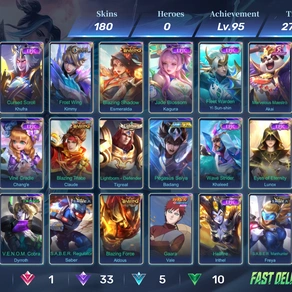
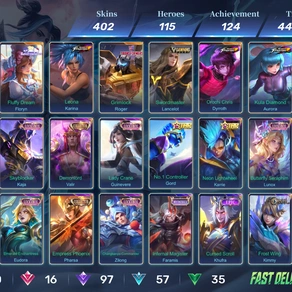
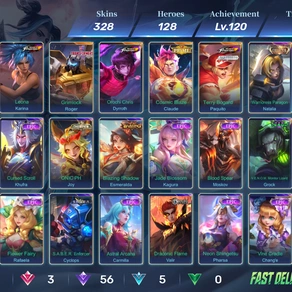
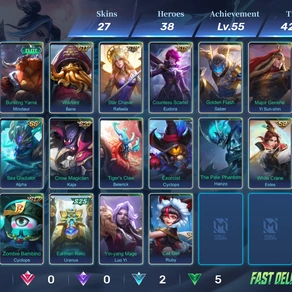
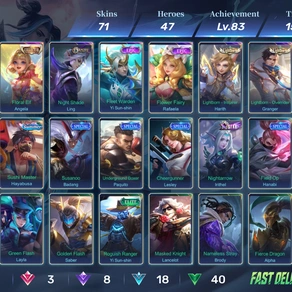
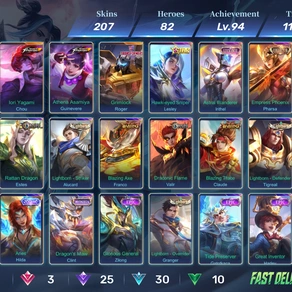
Hot-Selling Mobile legends bang bang accountMore
-
Keep this in mind
Those listing prices are what sellers are asking, not what buyers actually paid, so use them as a guide. And a fair price is based on what the account offers a buyer today, not what you spent building it.
5. How to List Your MLBB Account
Okay, you’ve done the hard part. Your stats are written down, your price is set, and your screenshots are ready to go. Now the listing itself is the easy bit, and it usually takes just a few minutes. Don’t rush it, though. Buyers can’t see you, so a clear, complete listing is the only way they’ll decide whether to trust you.
-
Why a marketplace helps
A dedicated marketplace like BuyAcc puts your account in front of people who are already searching for one, which is much safer than posting in random social media groups. BuyAcc supports automatic listing creation and game screenshots, so you don’t have to type every detail or capture every screen by hand. In practice, that means:
- Less manual typing, so fewer mistakes in numbers like rank, hero count, and skin count.
- Screenshots that come from the game itself, which helps buyers trust that what they see is real.
- A faster, more consistent listing, since you’re not building it from scratch.
Check BuyAcc’s current instructions for exactly how to start it, because the steps can change. Even with automatic features, read through the finished listing and fix anything wrong before you publish.
-
Step by step
- Create a seller profile. Register and complete your profile. A finished, verified profile builds trust right away.
- Pick the right category. Choose Mobile Legends: Bang Bang so buyers can find you. If you’re ready to sell MLBB accounts, that listing page is where you enter your details and publish.
- Add your account details, screenshots, title, and description. Work through these in the order you’d actually do them:
- Enter your details. Use automatic listing creation if it’s available, then compare every field with your list from Section 2.
- Add your screenshots. Use the game screenshots feature, and upload any extra ones you prepared, like your rare skins and season history.
- Write a title that does some work. Lead with your best features, like “Mythical Glory | 120 Heroes | 300+ Skins | Collector Skins”. Buyers should know what’s special before they even click.
- Write a description that’s easy to scan. Use bullet points for your rank, skin count, account level, key items, and login method. Be upfront about restrictions, including which login methods can’t be passed to the buyer.
- Set your price, publish, and reply fast. Quick replies lead to quicker sales.
6. How to Complete the Sale Safely
Listing is only half the job. How you handle the deal decides whether you actually get paid and whether the buyer stays happy.
-
Keep everything on the platform.
Do the whole deal through the marketplace’s official process, and don’t move to private chats. BuyAcc describes itself as offering a transfer process and payment escrow once a transaction is completed. That helps in a few ways:
- You get paid through the platform, not by sending money back and forth with a stranger. That cuts down the risk of buyers not paying and of payment scams.
- The transfer follows clear steps, so you and the buyer always know what happens next and nobody is left guessing.
Before you commit, read the current seller policies and check the details yourself: the fee, how long you wait to get paid, which payout methods are available, what verification you need, and the exact transfer steps.
-
Watch for scam signs.
Don’t share login details until the platform’s transfer process tells you to. If a buyer pushes you off the platform, asks for security codes early, or wants you to pay a fee to receive your money, treat that as a scam until proven otherwise.
-
Keep records and talk honestly.
Keep your screenshots, your chats with the buyer, and the original details of your account in case something goes wrong. If a buyer asks about something you can’t confirm, just say so, because guessing is how disputes start. After a genuine sale, don’t keep access to the account or try to take it back.
-
Mistakes that cost sellers money
| Mistake | What to do instead |
| Exaggerating account details | Describe only what you can show in screenshots |
| Uploading poor screenshots | Take clear, recent, uncropped ones |
| Ignoring buyer messages | Reply promptly and honestly |
| Not preparing the transfer | Confirm you can change the linked email and login details |
| Hiding limitations | Mention them in the listing before any payment |
| Pricing without research | Compare three to five similar listings first |
Conclusion
A smooth sale really comes down to three things: checking the rules first, being honest in your listing, and using an official platform for the deal. Even a great listing can’t remove every risk, and the game’s rules may restrict account transfers, so make that your first check. Here’s what I’d do today. Read Moonton’s current account policy, check which logins are bound to your account, and write down your rank, heroes, and skins. Then compare three similar listings before you publish.